Print Sudoku: Free Printable Sudoku Puzzles
Pick a difficulty and how many puzzles per page, then print or save a PDF. Answer pages are included.
Recent
Your last 10 settings, saved only in this browser. Nothing is uploaded.
Popular tools
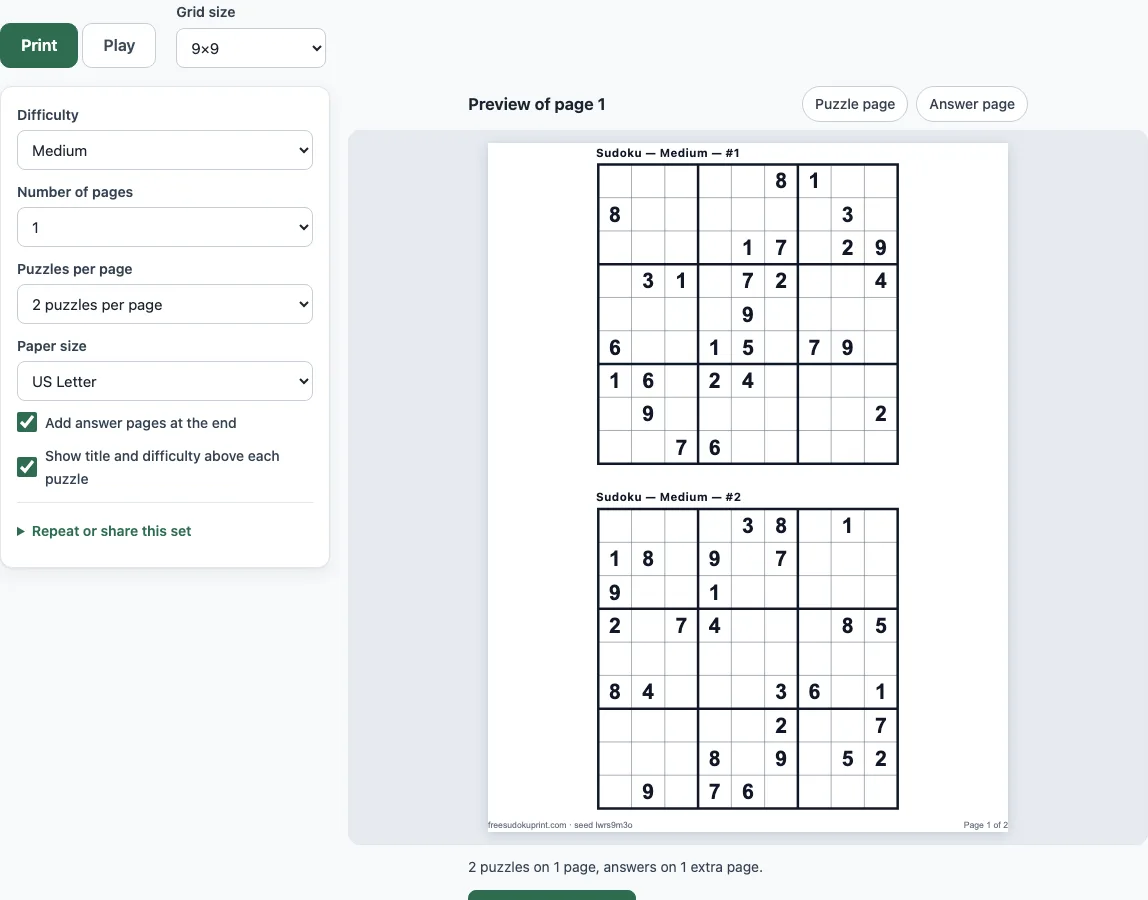
How to use the Print sudoku tool
- Open the Print tab. It is the tab this page starts on.
- Choose a difficulty: Easy, Medium, Hard, or Mixed (easy, medium and hard together). The page starts on Medium.
- Choose puzzles per page: 1, 2, 4 or 6. One per page gives a large print grid.
- Set the number of pages, from 1 to 20.
- Choose the paper size: US Letter or A4.
- Leave “Add answer pages at the end” on if you want answers, or turn it off. Answer grids are smaller, several fit on a page, and they are numbered to match the puzzles.
- Turn on “Show title and difficulty above each puzzle” if you want labels such as “Sudoku — Medium — #3”.
- Check the preview of page 1 and its answer page.
- Click “Print / Save as PDF”. The browser print dialog opens. To get a file, choose “Save as PDF” as the destination.
Puzzles are made one at a time, and a progress counter such as “Making puzzle 3 / 12…” shows how far along the set is. You can press Cancel at any time. The page footer shows the set’s seed. To print the same set again later, enter that seed in the Seed field under “Repeat or share this set”. On the Play tab, tap a cell, then a number on the number pad (or type it). Pencil mode (the P or Space key) writes small candidate notes instead of a digit.
What is the rule behind every printed sudoku?
Each puzzle is a 9x9 grid. You fill it so that every row, every column and every 3x3 box contains the digits 1 to 9 exactly once. The given digits, called clues, cannot be changed. A proper sudoku has exactly one solution, so every clue you need is already in the grid.
How many sudoku puzzles fit on one page?
You can print 1, 2, 4 or 6 puzzles per page on this page. With one puzzle per page, the grid fills the width of the page, which makes it the largest option. Four per page fits two rows of two. Six per page is the densest choice and gives the smallest grids.
Can I print sudoku with answers?
Yes. “Add answer pages at the end” is on by default. The answer grids are smaller than the puzzles, several fit on each page, and they are numbered to match the puzzles. The preview lets you check the answer page before you print. Every answer grid is the single solution that the solver confirmed for that puzzle.
How do I save the sudoku as a PDF?
Set your difficulty, puzzles per page, pages and paper size first. Then click “Print / Save as PDF”. The browser print dialog opens. Choose “Save as PDF” as the destination and save the file. The PDF contains the puzzles and, if the option is on, the answer pages.
Which difficulty should I print?
Difficulty depends on the solving techniques a puzzle needs. Easy puzzles can be solved with naked and hidden singles only. Medium puzzles need locked candidates (pointing or claiming) or naked and hidden pairs. Hard puzzles need triples, X-Wing, Y-Wing, Swordfish or XYZ-Wing. In the site’s tests, easy puzzles had 37 to 40 clues, while medium and hard puzzles had 26 to 30. So the difficulty comes from the techniques, not from the number of clues. Choose Easy for a first try, Medium for a typical puzzle, and Hard for a bigger challenge. Mixed puts all three levels in one set.
Is it really free?
Yes. The tool is free, requires no sign-up, and needs nothing installed. It runs in your web browser, and the puzzles are made on your device. Nothing is uploaded.
Can I print the same puzzles again?
Yes. The same seed with the same settings always gives the same puzzles. Copy the seed from the page footer, paste it into the Seed field under “Repeat or share this set”, and print again. Each press of New seed, and each new visit, gives different puzzles.
Large print sudoku for seniors: how do I set it up?
Set puzzles per page to 1 so the grid fills the page width. Choose easy difficulty if you want more of the grid filled in already, since easy puzzles have 37 to 40 clues. Print on the paper size you use most often, US Letter or A4, and turn on the title option if you want each sheet labelled. The large print sudoku for seniors page opens with these settings already chosen, and it also has a play tab with a larger on-screen board.
Frequently asked questions
Does every printed puzzle have one solution?
Yes. The built-in solver checks each puzzle before it is shown, so every puzzle has exactly one solution.
What does the label “Sudoku — Medium — #3” mean?
It shows the difficulty and the puzzle’s number within the set. Turn on “Show title and difficulty above each puzzle” to print it.
Can I stop a set while it is being made?
Yes. While puzzles are being made, the progress counter shows how far along the set is. Press Cancel to stop.
Can I solve the puzzles on screen instead of on paper?
Yes. The Play tab lets you solve a puzzle of the same kind on screen. Tap or click a cell, then a number on the number pad, or type the number.
What do the Play options do?
“Mark repeated digits in red” highlights a digit that repeats in a row, column or box. “Remove pencil marks automatically” removes a digit’s notes from the cells it sees when you place that digit.
Can I print a mix of difficulties?
Yes. Choose Mixed to get easy, medium and hard puzzles in the same set.
What is the most pages I can print at once?
You can choose from 1 to 20 pages for one set.
Can I use these sudoku puzzles in a KDP puzzle book?
Yes. Everything you make here is royalty-free for personal, classroom and commercial use, including Amazon KDP books, Etsy printables, Teachers Pay Teachers and print-on-demand products. Save the printed pages as a PDF and lay them out in your book. No credit is required. The only thing you may not do is copy the generator or the site itself to run a competing service; see the terms.
Related tools
- Easy sudoku: use this when you want puzzles that need only singles to solve.
- Medium sudoku: use this for puzzles that need locked candidates or pairs.
- Hard sudoku: use this when you want puzzles that need triples or fish techniques.
- Daily sudoku: use this to solve a new puzzle each day.
- Sudoku solver: use this to check or finish a puzzle you are stuck on.
- Sudoku generator: use this to make puzzles with your own settings.
- Killer sudoku: use this for a sudoku variant that adds cage sums.
- Blank sudoku grid: use this when you want an empty grid to write your own puzzle.
- How to play sudoku: use this to learn the techniques behind the difficulty levels.