Christmas Sudoku
Sudoku where the digits are Christmas pictures: a tree, a star, a bell and more. Print sheets with answers or play on screen.
Free · runs in your browser · nothing is uploaded
Recent
Your last 10 settings, saved only in this browser. Nothing is uploaded.
Christmas Sudoku is a free browser tool that makes sudoku puzzles with festive pictures in place of the digits 1 to 9. You fill the grid with a Christmas tree, star, bell, gift, candy cane, snowman, stocking, holly and ornament, and the usual rule applies: every row, column and box holds each picture exactly once. It runs in your web browser with no sign-up, and puzzles are made on your own device.
Pick a 4×4, 6×6 or 9×9 grid and Easy, Medium or Hard. Print sheets with answer pages, or play on screen with hints. A Symbols menu switches the same puzzle back to plain numbers.
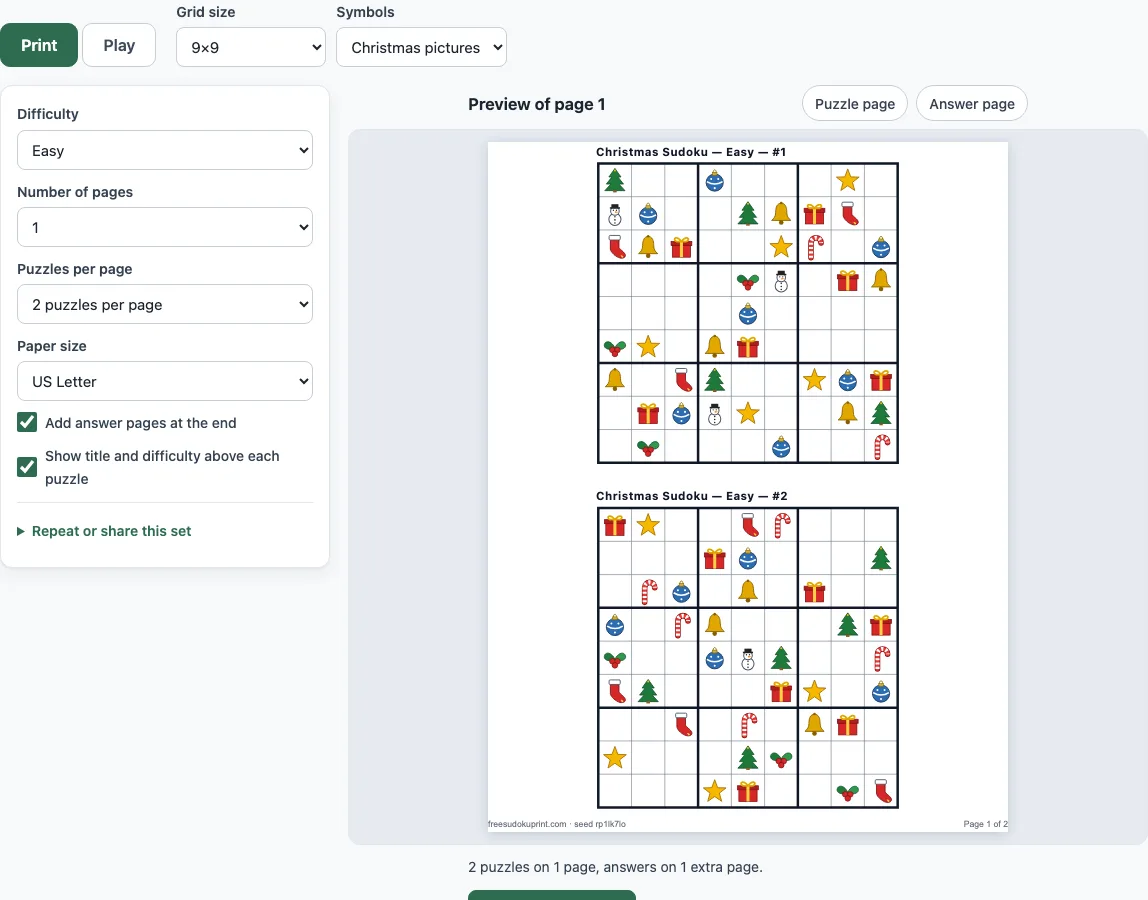
How to use the Christmas Sudoku tool
To make printable sheets:
- Stay on the Print tab. Above the settings, pick a Grid size and leave Symbols on Christmas pictures: 4×4 for the youngest children, 6×6 for beginners, 9×9 for a full puzzle.
- Set Difficulty to Easy, Medium, Hard or Mixed.
- Set Number of pages (1 to 20) and Puzzles per page. For 4×4 and 6×6 you can fit 2, 4, 6, 9 or 12 on a sheet; for 9×9 it is 1, 2, 4 or 6.
- Choose US Letter or A4 paper. Leave “Add answer pages at the end” on to get the answers as pictures.
- Check the preview, then click Print / Save as PDF.
To play on screen:
- Open the Play tab, tap a cell, then tap a picture on the pad. On a keyboard, the keys 1 to 9 enter the pictures in this order: tree, star, bell, gift, candy cane, snowman, stocking, holly, ornament.
- Press Hint for a one-sentence explanation, or use Check to mark wrong cells. Pencil mode (the button, or the P or Space key) writes small candidate pictures in a cell, and Ctrl/Cmd+Z undoes a move.
- To share a set, use Copy link, or enter the same seed under “Repeat or share this set” to get the same puzzles again.
To use plain numbers, open the Symbols menu and choose Numbers.
What is Christmas sudoku?
Christmas sudoku is an ordinary sudoku with a holiday look. The logic is identical to a number puzzle: each row, column and box must contain every symbol once. Because the symbols are pictures, no one has to add or compare numbers, so it suits children who cannot read digits well yet and families who want a puzzle for the holiday table. The pictures are drawn with different shapes as well as colours, so a black-and-white printout stays easy to read.
Is there a Christmas sudoku printable?
Yes. The Print tab makes a ready-to-print sheet, and answer pages with every picture are added at the end. A 4×4 sheet holds up to 12 puzzles and a 9×9 sheet up to 6. Each set has a seed printed in the footer, and the same seed with the same settings always gives the same puzzles, so you can print a set again later.
How is this different from Sudoku for Kids?
Sudoku for Kids uses the digits 1 to 9 and teaches the rules with small number grids. This page is a picture sudoku: the same puzzles, but the digits are replaced by Christmas pictures, and it also offers Hard puzzles. If you want to switch a child from pictures to numbers later, use the Symbols menu here or open the kids page.
How do you solve a Christmas sudoku?
Look for a cell where only one picture is still possible. Here is a real Easy 4×4 puzzle from this tool, with the pictures written as numbers (1 tree, 2 star, 3 bell, 4 gift). A dot is an empty cell:
- Row 1: . . 3 2
- Row 2: . . 4 1
- Row 3: 2 3 . .
- Row 4: 4 1 . .
Take the top-left cell. Its row already has a bell and a star, and its column has a star and a gift, so only the tree fits. Now the cell next to it must be the gift, the one picture row 1 still lacks. Repeating this check fills all eight empty cells, and the finished grid is 1 4 3 2 / 3 2 4 1 / 2 3 1 4 / 4 1 2 3. Every larger puzzle uses the same idea, plus a few more techniques that the Hint button names.
Why use pictures instead of numbers?
Numbers in a sudoku are only labels, but they look like arithmetic. Pictures remove that, so a child can spot that two bells are in one row without reading a digit. They also make a themed sheet for a class party, a holiday card insert or a puzzle book.
How hard are the puzzles?
The number of pictures printed in the grid sets the level. An Easy 4×4 puzzle shows 8 pictures out of 16 cells and a Medium one shows 6. An Easy 6×6 shows 18 of 36 and a Medium one 14. An Easy 9×9 shows about 38 of 81. Every puzzle has exactly one solution, checked by the built-in solver before it appears.
Frequently asked questions
Which Christmas pictures are used?
Nine: a Christmas tree, star, bell, gift, candy cane, snowman, stocking, holly and ornament. A 4×4 grid uses the first four (tree, star, bell, gift), and a 6×6 grid uses the first six (adding candy cane and snowman).
What size is best for children?
Start with 4×4 Easy, where half the cells are already filled. Move to 6×6 when that feels comfortable, and try 9×9 Easy when single steps come naturally.
Can I print Christmas sudoku with answers?
Yes. Answer pages are added at the end by default, with small grids numbered to match the puzzles. Switch off “Add answer pages at the end” if the answers should stay hidden.
Can I play Christmas sudoku on a phone?
Yes. Tap a cell and then a picture on the pad. The pad has large buttons, and the board fits a phone screen with no sideways scrolling.
Can I use numbers instead of pictures?
Yes. The Symbols menu switches between Christmas pictures and numbers 1 to 9 for the same puzzle, on both the Print and Play tabs.
Is it free for commercial use?
Yes. The puzzles you print are free for home, classroom and commercial use, including Etsy printables, Teachers Pay Teachers and KDP puzzle books, with no credit needed. The only limit is that you may not copy the generator itself to run a competing service.
Related tools
- Sudoku for Kids: Use this for number-based 4×4, 6×6 and 9×9 puzzles for children.
- 4x4 Sudoku: Use this for the smallest sudoku, with up to 12 puzzles on a sheet.
- 6x6 Sudoku: Use this for a mini sudoku one step above 4×4.
- Easy Sudoku: Use this for easy 9×9 puzzles with numbers.
- How to Solve Sudoku: Use this to learn the rules and the first techniques.
- Sudoku Variants: Use this to browse diagonal, hyper, jigsaw, killer and Samurai sudoku.
- Sudoku Generator: Use this to make a batch of puzzles or set your own.