Sudoku for Kids
Start with a 4x4 grid, move up to 6x6 and 9x9. Print puzzles with answers or play on screen.
Recent
Your last 10 settings, saved only in this browser. Nothing is uploaded.
Sudoku for Kids is a free browser tool that makes classic sudoku puzzles for children and beginners, ready to print or play on screen. It runs in your web browser with no sign-up and nothing to install, and puzzles are made on your own device, so nothing is uploaded. Every puzzle has exactly one solution, checked by the built-in solver before it appears.
You can choose a 4×4, 6×6 or 9×9 grid, with Easy or Medium difficulty. The 4×4 size is the default and suits a first game, since it uses the digits 1 to 4 and needs no arithmetic. The Print tab makes printable sudoku for kids with optional answer pages, and the Play tab lets a child solve puzzles on screen with hints.
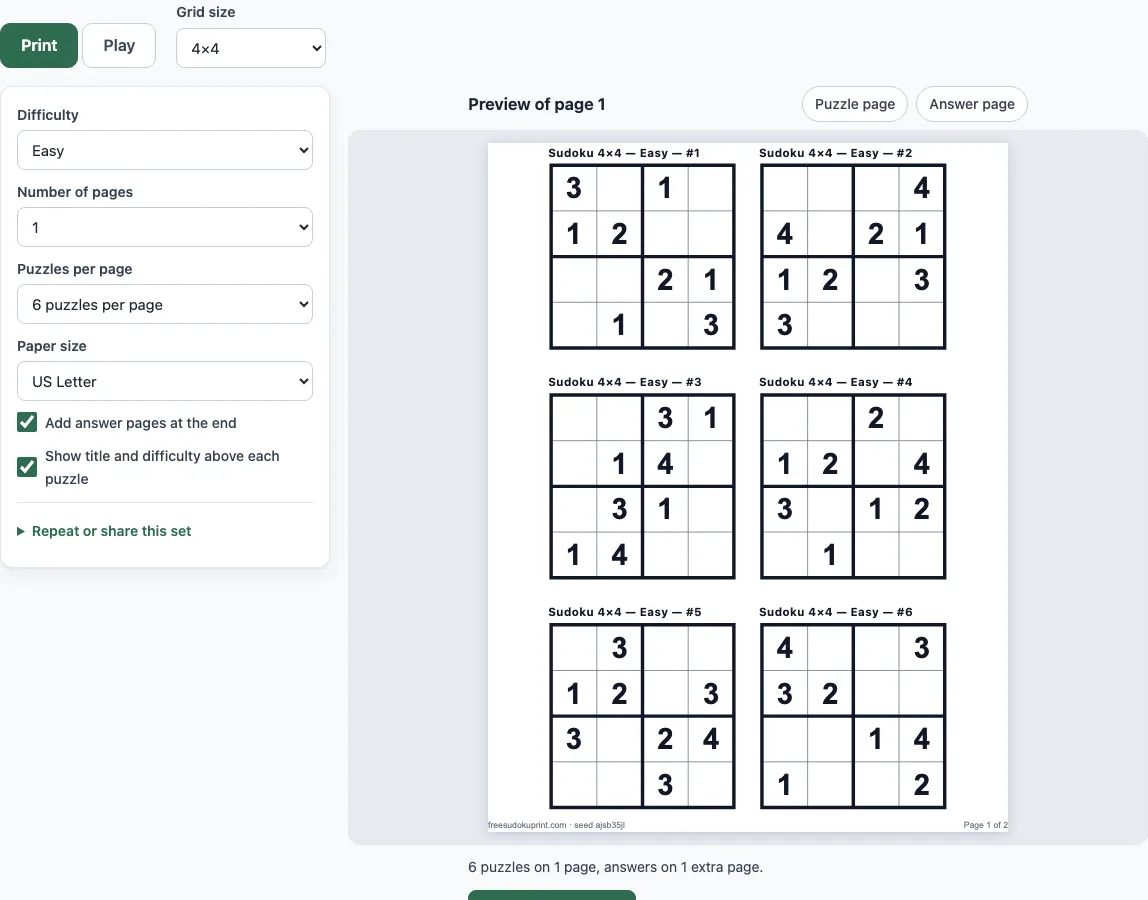
How to use the Sudoku for Kids tool
To make printable sheets:
- Open the Print tab, which is the tab the page starts on. Above the settings, Grid size starts on 4×4; choose 6×6 or 9×9 if you need a bigger grid.
- Set Difficulty to Easy (the default), Medium or Mixed.
- Set Number of pages (1 to 20) and Puzzles per page. For 4×4 and 6×6 the options are 2, 4, 6, 9 or 12; for 9×9 they are 1, 2, 4 or 6.
- Choose US Letter or A4 paper. Leave “Add answer pages at the end” on for answers, or switch it off.
- Check the preview of page 1, then click Print / Save as PDF. Choose Save as PDF as the destination to get a file.
To play on screen:
- Open the Play tab, tap or click a cell, then tap a number on the number pad or type it.
- Press Hint for a one-sentence explanation of the next step, or Fill it in to place the digit. Check marks wrong cells in red.
Turn on “Mark repeated digits in red” to see a repeated digit straight away. Pencil mode (the button, or the P or Space key) writes small candidate notes instead of a digit, and Ctrl/Cmd+Z and Ctrl/Cmd+Y undo and redo. To share a set, use Copy link, or enter the seed under “Repeat or share this set”. The same seed and settings always give the same puzzles.
Do kids need maths to play sudoku?
No. The numbers are labels, not something to add or multiply. The only rule is that every row, every column and every box contains each digit exactly once. At 4×4 the digits are 1 to 4 and each box is 2×2; at 6×6 the digits are 1 to 6 and each box is 3 cells wide and 2 high; at 9×9 the digits are 1 to 9 in nine 3×3 boxes. The rule is the same at every size.
How do you play sudoku for beginners?
Start by looking for a row, column or box that already has three of its four digits. The missing digit goes in the empty cell. Then pick an empty cell and ask which digits are already in its row, column and box. If only one digit is left, write it in. This is a Naked Single, the first technique the Hint button names.
A Hidden Single works the other way round. It is a digit that has only one place left in a row, column or box, even if that cell could hold other digits.
Here is a real Easy 4×4 puzzle from this tool. Rows run top to bottom, and a dot is an empty cell:
- Row 1: . 3 2 .
- Row 2: . 1 4 .
- Row 3: . 2 3 .
- Row 4: . 4 1 .
Take the top-left cell, R1C1 (row 1, column 1). Row 1 already has 3 and 2. Its top-left box has 3 and 1. Together these are 1, 2 and 3, so only 4 is left, and R1C1 = 4. Now row 1 holds 4, 3 and 2, so R1C4 can only be 1. Repeating this check fills all eight empty cells as Naked Singles, and the finished grid is 4 3 2 1 / 2 1 4 3 / 1 2 3 4 / 3 4 1 2.
How do the sizes and levels differ?
A grid has more clues when it is easier. On this page a 4×4 Easy puzzle always has 8 clues out of 16 cells and a Medium one has 6. A 6×6 Easy puzzle has 18 clues out of 36 and a Medium one 14. A 9×9 Easy puzzle has 37 to 40 clues out of 81, and a Medium one 25 to 32. Medium 9×9 puzzles need more than simple singles, so move to them only when a child is happy with Easy.
Frequently asked questions
What size sudoku is best for kids, 4x4, 6x6 or 9x9?
Start with 4×4. It has 16 cells, and the Easy puzzles give 8 clues, so it is short enough to finish in one sitting. Move to 6×6 when that feels comfortable, and try 9×9 Easy puzzles once single-digit steps come naturally.
How can I teach a child to solve sudoku?
Work through the first puzzle side by side. Ask the child to read one row, column or box aloud and name the missing digit, and let them write it in. When they are stuck, press Hint and read the explanation together before using Fill it in.
Can I print sudoku for kids with answers?
Yes. Answer pages are added at the end by default. For 4×4 and 6×6 each answer page holds 20 small grids, and for 9×9 it holds 12, all numbered to match the puzzles. Switch off “Add answer pages at the end” if the child should not see the answers.
Is it free?
Yes. The tool is free, with no sign-up and nothing to install. The sheets can be used in class, at home, or in products you sell, such as KDP books or Etsy printables, and no credit is required.
Can I print the same puzzles again later?
Yes. Each set has a seed printed in the footer, and the same seed with the same settings always gives the same puzzles. Enter the seed in the Seed field under “Repeat or share this set” to print the set again.
Related tools
- 4x4 sudoku: Use it when you want to focus only on the smallest grid.
- 6x6 sudoku: Use it for the step up from 4×4 once the smaller grid feels easy.
- Easy sudoku: Use it to find puzzles with the most clues for a gentle start.
- How to play sudoku: Use it to learn the techniques behind each step.
- Blank sudoku grid: Use it when you want an empty grid to draw or copy by hand.
- Medium sudoku: Use it when a child is ready for puzzles with fewer clues.
- Sudoku generator: Use it to make puzzles with settings beyond this page’s options.
- Printable sudoku: Use it to print a general set of sudoku puzzles.