Large Print Sudoku for Seniors
One big 9x9 puzzle per page, with answers. Print it, or play on screen with a large board.
Recent
Your last 10 settings, saved only in this browser. Nothing is uploaded.
Large print sudoku for seniors is a free puzzle maker that runs in your web browser, with no sign-up and nothing to install. It makes classic 9×9 sudoku puzzles with large digits that you can print on US Letter or A4 paper, or play on screen. Every puzzle has exactly one solution, so there is always one correct answer to find.
The page opens on the Print tab with one puzzle per page and Easy difficulty already selected. You can choose Medium, Hard or Mixed, and print one or two puzzles per page. You can also set the number of pages, from 1 to 20, and add answer pages at the end. Puzzles are made on your own device, and nothing is uploaded.
The Play tab sits next to the Print tab. It is built for use on a screen, with a larger board and larger buttons.
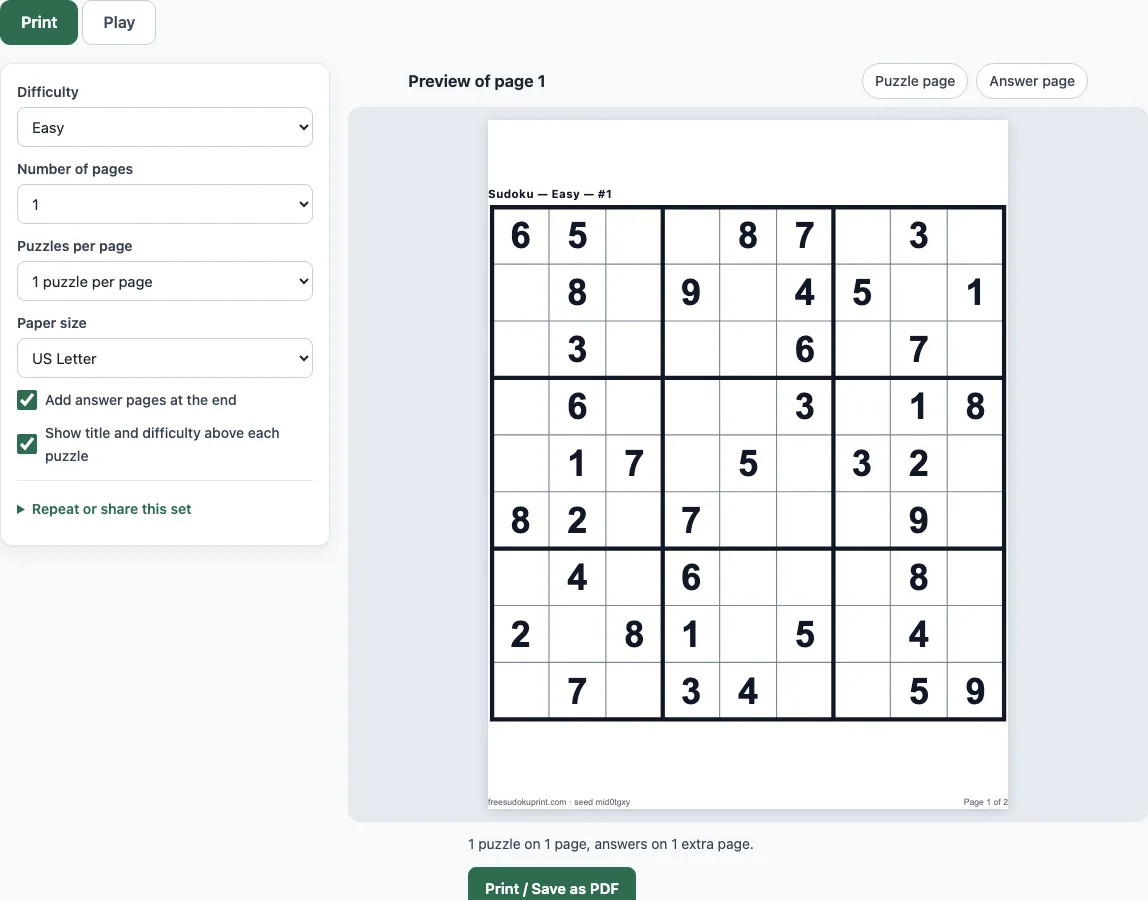
How to use the large print sudoku tool
To print puzzles:
- Open the Print tab. It is selected when the page loads.
- Set Difficulty to Easy, Medium, Hard or Mixed.
- Set Puzzles per page to 1 for the largest digits, or 2 for a smaller sheet.
- Enter the Number of pages (1 to 20) and choose a Paper size, US Letter or A4.
- Tick or untick Add answer pages at the end and Show title and difficulty above each puzzle.
- Click Print / Save as PDF. Check the preview of page 1 and its answer page, then continue in the browser’s print dialog.
To play on screen:
- Open the Play tab. Tap or click a cell, then enter a number.
- Press the Pencil button (or the P or Space key) to write small candidate notes instead of a digit.
- Use Hint when you are stuck, Check to mark wrong cells in red, or Reveal cell to fill in one answer.
Turn on Mark repeated digits in red to see a repeated digit straight away. Arrow keys move the selection, Backspace erases, and Ctrl/Cmd+Z undoes a move. Your progress is saved on this device, so a reload continues the same puzzle. Copy link gives a link that opens exactly the same puzzle on another device.
What are the rules of sudoku?
Sudoku uses one rule. Fill the 9×9 grid so that every row, every column and every 3×3 box contains the digits 1 to 9 exactly once. The digits already printed in the grid are clues, and they cannot be changed. A well-made puzzle has exactly one solution. This tool checks each puzzle with a built-in solver before it is shown, and it makes only classic 9×9 puzzles.
How big is large print sudoku?
On US Letter with one puzzle per page, the digits are about 38 pt, and the grid is about 7.6 inches (191.9 mm) wide with cells of 21.3 mm. With two puzzles per page on US Letter, the digits are about 22 pt and the grid is 112 mm wide. On A4, one puzzle per page gives digits of about 37 pt in a 186 mm grid, and two per page gives about 24 pt in a 121 mm grid. These are the digit sizes on this page only. The standard layouts on the main print page are smaller, with digits of about 18 pt at 4 per page and about 14 pt at 6 per page. For the largest digits, print one puzzle per page.
Which level should seniors start with?
Start with Easy. Measured across 40 puzzles per level, Easy puzzles have 37 to 40 of the 81 cells filled in as clues. Medium puzzles have 25 to 32 clues, and Hard puzzles have 24 to 31. Easy puzzles can be solved with two techniques. A Naked Single is a cell with only one possible digit left. A Hidden Single is a digit that fits in only one cell of a row, column or box. A first-time solver rarely needs anything more. When Easy feels comfortable, move to Medium. The Hint button names the next technique and explains it in one sentence.
Can I use these puzzles in an activity group?
Yes. Set Number of pages to as many sheets as the group needs (up to 20) and choose Mixed difficulty if people have different levels; Mixed rotates through Easy, Medium and Hard. Keep the answer pages at the end for the person leading the session and print the puzzle pages only for everyone else. Each sheet carries the seed in its footer, so the same set can be printed again for another group.
Frequently asked questions
Can I print large print sudoku for free as a PDF?
Yes. Set your options on the Print tab, then click Print / Save as PDF. In the browser’s print dialog, choose Save as PDF as the destination. The file can be opened on a tablet or printed later.
Is there a large print sudoku to play online?
Yes. The Play tab works in your browser with no sign-up. Its board is up to 680 pixels wide, and its number pad and text are larger than on the site’s other pages. On a tablet or phone, tap the number pad. On a computer, type the digits.
Can I make and sell a large print sudoku book?
Yes. The sheets can be used in products you sell, such as large print puzzle books on KDP. No credit is required.
Does it work on a tablet, and is it free?
Yes to both. The tool is free, needs no sign-up and nothing to install. The number pad can be tapped on a tablet, and the PDF can be opened on one.
Can I remove the answer pages or puzzle labels?
Yes. Untick Add answer pages at the end to print puzzles only. Untick Show title and difficulty above each puzzle to remove the label. The footer shows the set’s seed, and the same seed gives the same puzzles again.
Related tools
- Printable sudoku for a range of printable sheets with standard-sized digits.
- Easy sudoku when you want more Easy puzzles on screen.
- Medium sudoku once Easy puzzles feel comfortable.
- Hard sudoku for puzzles with fewer clues.
- Daily sudoku for one new puzzle each day.
- How to play sudoku to learn the techniques behind each hint.
- Blank sudoku grid to write out your own puzzle by hand.
- Sudoku solver to check a puzzle you are stuck on.