Suguru
Fill each region with 1 to its size, with no equal digits touching. Play or print.
Recent
Your last 10 settings, saved only in this browser. Nothing is uploaded.
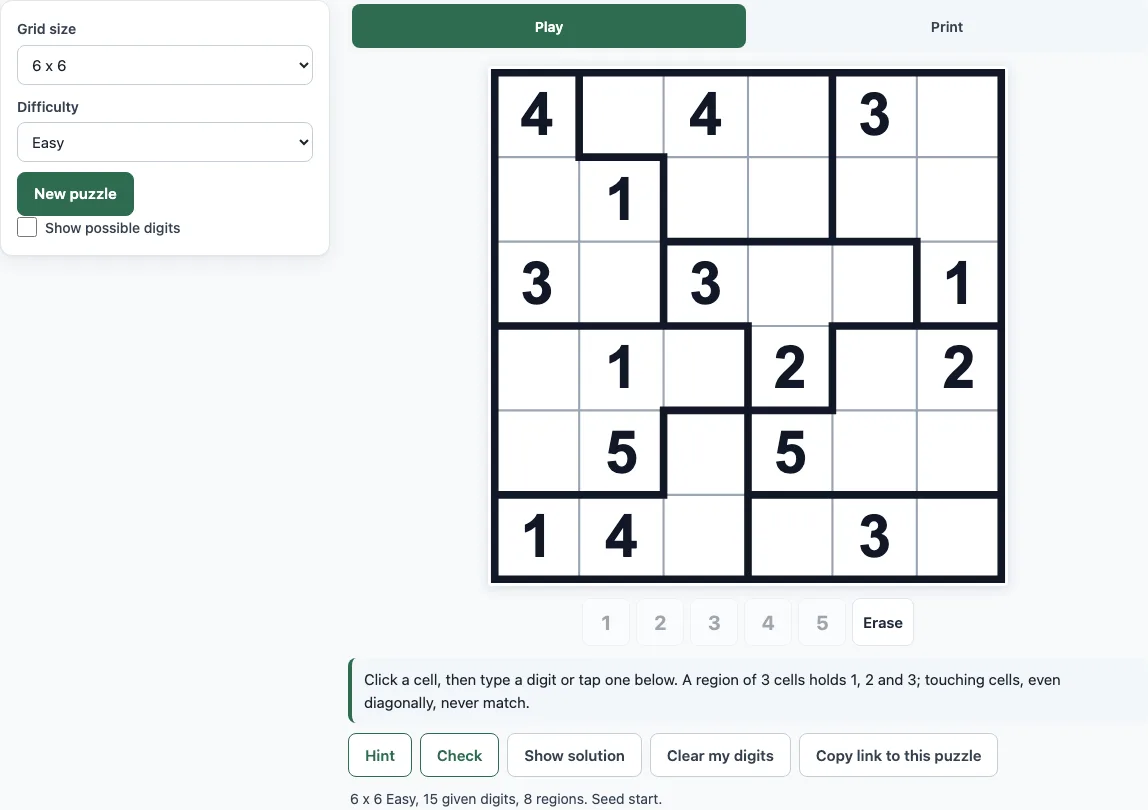
How to use the Suguru tool
- The Play tab opens first. Choose a Grid size of 5 x 5, 6 x 6, 7 x 7 or 8 x 8. The default is 6 x 6.
- Choose a Difficulty: Easy (the default), Medium or Hard.
- Press New puzzle to make a random puzzle. The line under the board shows the size, level, number of given digits, number of regions and the seed.
- Click or tap a cell, then type a digit from 1 to 5, or press a digit button under the board. A greyed-out button means the digit is larger than the region of the selected cell allows.
- Press Erase or Backspace to remove a digit. Use the arrow keys to move the selection.
- Press Hint for a green cell and one sentence explaining why it is forced. Press Check to mark wrong digits in red and count them. Press Show solution to reveal the answer, and press it again to hide it.
- Tick Show possible digits to see the digits each empty cell can still take, written in small grey type.
A cell turns red when a digit repeats in its region or next to a touching cell. Use Clear my digits to start over and Copy link to this puzzle to share it. On the Print tab, choose puzzles per page, the number of pages and the paper, then press Print / Save as PDF; the same seed gives the same puzzles.
What are the rules of suguru?
Suguru is played on a grid divided into regions, also called blocks or rooms, which are outlined with thick lines. Each region is made of 1 to 5 connected cells. A region with k cells must contain the digits 1 to k, each exactly once. So a 5-cell region holds 1, 2, 3, 4 and 5, a 2-cell region holds 1 and 2, and a single-cell region is always 1. The second rule is that two cells that touch, sideways or diagonally, can never hold the same digit.
How do you solve a suguru, step by step?
Start with the easy facts. Fill every single-cell region with 1, and look at two-cell regions next to a given digit. Then work through the empty cells one at a time:
- For each empty cell, list the digits its region still needs.
- Cross out any digit that already appears in one of its touching cells (up to 8 of them).
- If only one digit is left, write it in.
- If a digit that a region needs can fit in only one cell of that region, write it in. This is a hidden single.
- Repeat until the grid is full.
Here is a real Easy 5 x 5 example, with regions named by letter. Region D is two cells, R1C4 and R1C5, so it holds 1 and 2. R1C5 already shows 2, so R1C4 must be 1. Next, R1C3 belongs to region C, which already holds 4, 2 and 5. It cannot be 1 because R1C4 touches it, and it cannot be 2 because R1C2 touches it. That leaves 3, so R1C3 is 3. (R = row, C = column, counted from the top left.)
What is the difference between suguru and sudoku?
In sudoku, every row, column and box must contain each digit once. Suguru has no rows or columns to fill. The thick-lined regions set which digits are needed, and the rule about touching cells replaces the row and column rule. Diagonal neighbours count as touching in suguru, so a digit cannot repeat in any of the eight cells around it. Also, suguru digits only go up to 5, because the largest region has 5 cells.
Is suguru the same as tectonic?
Yes. Tectonic is another name for the same puzzle, with the same rules: regions filled with 1 to k, and no repeated digit in touching cells. If you search for a tectonic puzzle, you can use this page in the same way.
How hard are the puzzles?
Difficulty depends on which techniques are needed. Easy puzzles can be finished using only cells that have one possible digit left. Medium puzzles also need hidden singles. Hard puzzles still have one solution, but they need more than those two methods, such as pairs or trying a digit. Each level also keeps a minimum share of given digits. On a 6 x 6 board, the average number of given digits is 15 for Easy, 11 for Medium and 6.8 for Hard, out of 36 cells.
Frequently asked questions
Can I print suguru puzzles with answers?
Yes. Open the Print tab and leave Add answer pages at the end turned on. The answer pages show 6 small grids per page, or 4 at 8 x 8, with the answers in green.
Can I play suguru online for free?
Yes. The puzzles are free, you do not need to sign up, and you do not need to install anything. Everything runs in your browser.
Is there a suguru solver?
There is no solver for puzzles from other sources. Hint and Check only work on the puzzles made on this page, so you cannot type in a puzzle from a book and have it solved.
Why did a cell turn red?
A red cell means a digit breaks a rule: it repeats in its region or sits next to a touching cell with the same digit. Check the red cells before anything else.
Does every puzzle have only one answer?
Yes. The built-in solver checks each puzzle for exactly one solution before it is shown.
How do I get the same puzzle again?
Use the seed shown under the board, or press Copy link to this puzzle and open the link later. On the Print tab, the same seed with the same settings always gives the same puzzles.
How long does it take to make a puzzle?
Most sizes take a fraction of a second. An 8 x 8 puzzle can take up to about 2 seconds. When you print many pages, the puzzles are made one after another, and a counter shows the progress.
Related tools
- Printable sudoku: use it if you want classic sudoku sheets to print.
- Jigsaw sudoku: use it if you like sudoku with irregular regions, which work similarly to suguru blocks.
- Killer sudoku: use it if you want a harder sudoku that adds cage sum clues.
- 4x4 sudoku: use it for a small grid that is quick to finish.
- 6x6 sudoku: use it for a mid-size grid with the usual sudoku rules.
- How to play sudoku: use it to learn sudoku techniques that apply to suguru too.
- Diagonal sudoku: use it if you want an extra rule on both main diagonals.
- Sudoku for kids: use it for an easier introduction to number puzzles.