Wordoku Puzzles with Answers
Sudoku with nine letters instead of digits. Play on screen, or print sets with answers.
Recent
Your last 10 settings, saved only in this browser. Nothing is uploaded.
How to use the Wordoku
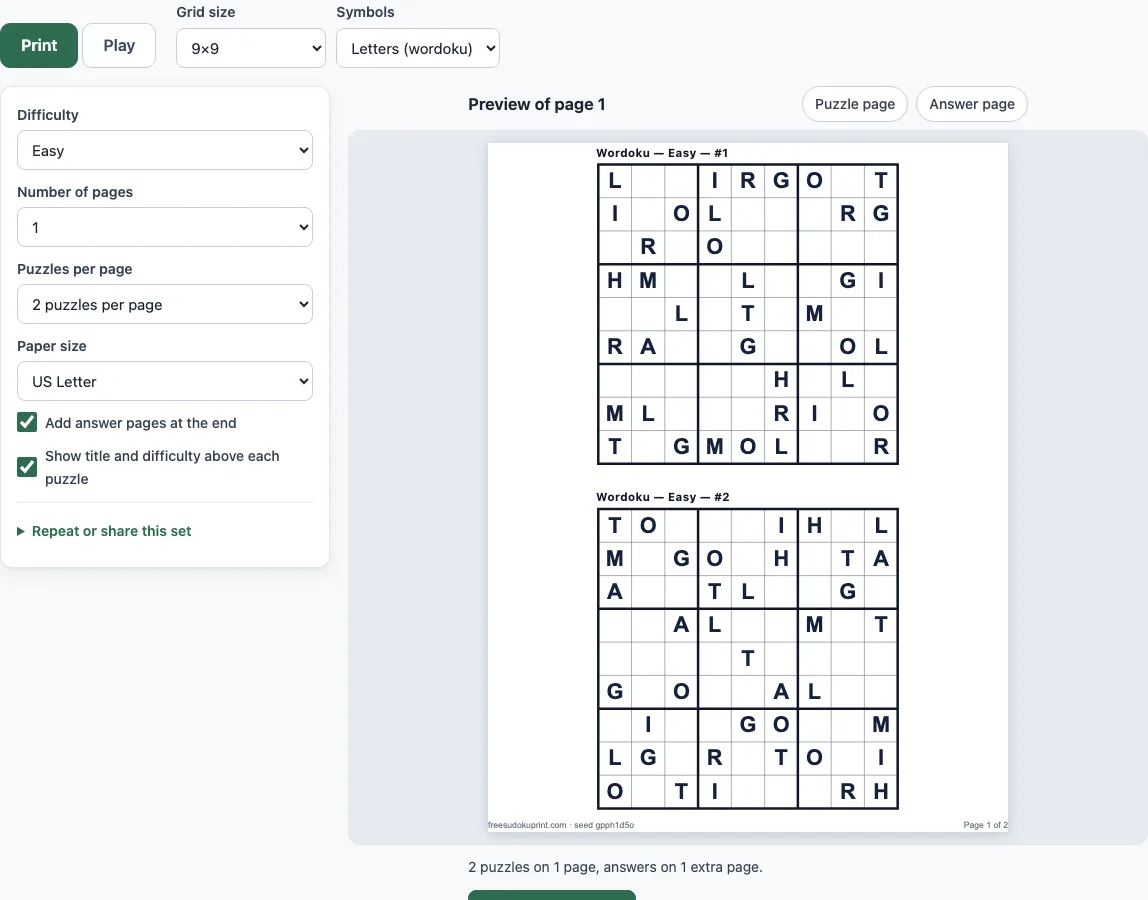
The Print tab opens first. To make a printable set:
- Set Grid size to 4×4, 6×6 or 9×9. The default is 9×9.
- Under Symbols, keep Letters (wordoku). Choose Numbers if you want the same puzzle with the digits 1 to 9 instead.
- Set Difficulty to Easy, Medium, Hard or Mixed. Easy is the default.
- Set Number of pages (1 to 20), Puzzles per page, and the paper size, US Letter or A4.
- Look at the preview of page 1 and its answer page. Answer pages are on by default.
- Print the set.
To play on screen, open the Play tab:
- Tap a cell, then tap a letter on the pad under the board. You can also press A, L, G, O, R, I, T, H or M on the keyboard. The keys 1 to 9 give the letters in the same order.
- Turn on pencil mode with the button, or press P or Space, to write small candidate letters in a cell.
- If you get stuck, use Hint, Check, Reveal cell or Show solution.
Backspace erases, the arrow keys move between cells, and Ctrl/Cmd+Z and Ctrl/Cmd+Y undo and redo. Your progress is saved in the browser on this device. To share a set, use the seed in the “Repeat or share this set” section on the Print tab: the same seed and settings give the same puzzles.
What is wordoku and how is it different from sudoku?
Wordoku is a sudoku puzzle in which the nine symbols are letters instead of digits. It is also called word sudoku or letter sudoku, and the rules are exactly the same as for ordinary sudoku.
The letters here are A, L, G, O, R, I, T, H and M, which are the nine different letters of ALGORITHM. The tool does not spell that word out in the grid; the letters are only the nine symbols. The order is fixed: A is 1, L is 2, G is 3, O is 4, R is 5, I is 6, T is 7, H is 8 and M is 9. A 4×4 grid uses the first four letters (A, L, G, O), a 6×6 grid uses the first six (A, L, G, O, R, I), and a 9×9 grid uses all nine.
Because a wordoku is a normal sudoku with different symbols, every technique you know for sudoku works on it. Switching to Numbers shows the same puzzle with digits, which is useful if you already know the digit version well.
How do you play and solve wordoku?
You fill the empty cells so that every row, every column and every box contains each letter exactly once. A box is one of the 3×3 blocks in a 9×9 grid (2×2 in 4×4 and 2×3 in 6×6). Each letter appears once in every row, column and box, and no letter repeats in any of them.
Most solving starts with two simple checks. A naked single is a cell where only one letter is still possible. A hidden single is a letter that has only one place left in a row, column or box. Scan for these first, repeating after each new letter you place.
When neither check works, write small candidate letters in the empty cells, which is what pencil mode is for. Then look for pairs and triples, where a few cells share the same few candidates, and for wings such as X-Wing and Y-Wing. Difficulty is set by the techniques a puzzle needs, not by how many letters are given. Easy puzzles need only singles, Medium also needs locked candidates and pairs, and Hard needs triples, X-Wing, Y-Wing, Swordfish or XYZ-Wing. The Hint button names the technique it uses and explains the step in one sentence.
Frequently asked questions
Can I print wordoku puzzles with answers?
Yes. On the Print tab, answer pages are added at the end of the set and are on by default. The answers are drawn as letters, with several small grids on each page. You can also choose how many puzzles appear on each page and whether the paper is US Letter or A4.
Can I play wordoku online for free?
Yes. The tool is free, needs no sign-up and nothing to install. It runs in your web browser, and the puzzles are made on your device, so nothing is uploaded. Your progress is saved in the browser on this device.
Is there a wordoku solver?
This page does not have a separate solver for your own puzzles. The Play tab has Hint, Check, Reveal cell and Show solution, which work on puzzles made here. To solve a wordoku from a book or newspaper, replace each letter with its digit from 1 to 9 (A = 1 up to M = 9), enter the digits into the sudoku solver on this site, then translate the answer back into letters.
What letters does this wordoku use?
It uses A, L, G, O, R, I, T, H and M, the nine letters of ALGORITHM, in that fixed order. A 4×4 grid uses only A, L, G and O, and a 6×6 grid uses A, L, G, O, R and I. To see the same puzzle with digits, choose Numbers under Symbols, or open the page with ?sym=0 at the end of the address.
Is it free, and does it work on a phone?
It is free and needs nothing to install, because it runs in the web browser. On the Play tab you enter letters by tapping a cell and then tapping a letter on the pad under the board, so tapping is the main way to fill the grid. You can also type the letters on a keyboard.
How do I get the same wordoku puzzles again?
Use the seed shown in the “Repeat or share this set” section on the Print tab. The same seed with the same settings gives the same puzzles, so you can print or share a set and get it back later.
Related tools
- Printable sudoku for classic digit puzzles you can print in the same way.
- Easy sudoku when you want a gentle start with digits before trying letters.
- Sudoku solver to check a digit version of a puzzle you are stuck on.
- How to play sudoku for a step-by-step guide to the techniques that also apply to wordoku.
- Sudoku generator to make new digit puzzles with your own settings.
- Hard sudoku when you want puzzles that need advanced techniques.
- Sudoku for kids for younger players who are learning the rules.
- Daily sudoku for a new puzzle to solve each day.